Reconcile your trust account and sign off the worksheet
Today you can classify every bank account in Kera, reconcile each one against its statement, and sign off a trust reconciliation worksheet. If you hold rent and deposits for other people, the money in the trust account has to match what you owe owners and tenants. Most small teams find out it doesn't at month-end, or later, when a statement looks off.
Kera lays the two side by side. You tell it which accounts hold trust money, and the worksheet sets their balance against what your books say you owe. You check it, download it and sign it off, so there's a record of who checked it and when. Reconciliation and the worksheet work for landlords and for property management teams.Note 1
Classify every bank account
Each bank account in Kera has a classification: Operating, Trust, Security Deposit Trust, Reserve, Credit Card or Clearing. It also has an ownership scope: your firm, a trust account for one owner, or a trust account shared across your portfolio. That tells Kera which balances count as trust money.
You can connect accounts through Plaid or add them by hand. Give each trust account a name with the word "Trust" in it, for example "Owner Funds in Trust". When you add a trust account by hand, Kera checks the name before it saves the account.
Decide how big a gap is too big
Kera adds up the balances of your Trust and Security Deposit Trust accounts and compares that total with what you owe owners plus the tenant deposits you hold. The Trust discrepancy alert threshold decides how big a difference still counts as in balance.
You set the threshold in Settings, under Accounting. It starts at $100. The comparison is only as good as the bank balance Kera has on file, so check the trust bank balance Kera shows against your latest bank statement before you rely on it.
Reconcile each account against its statement
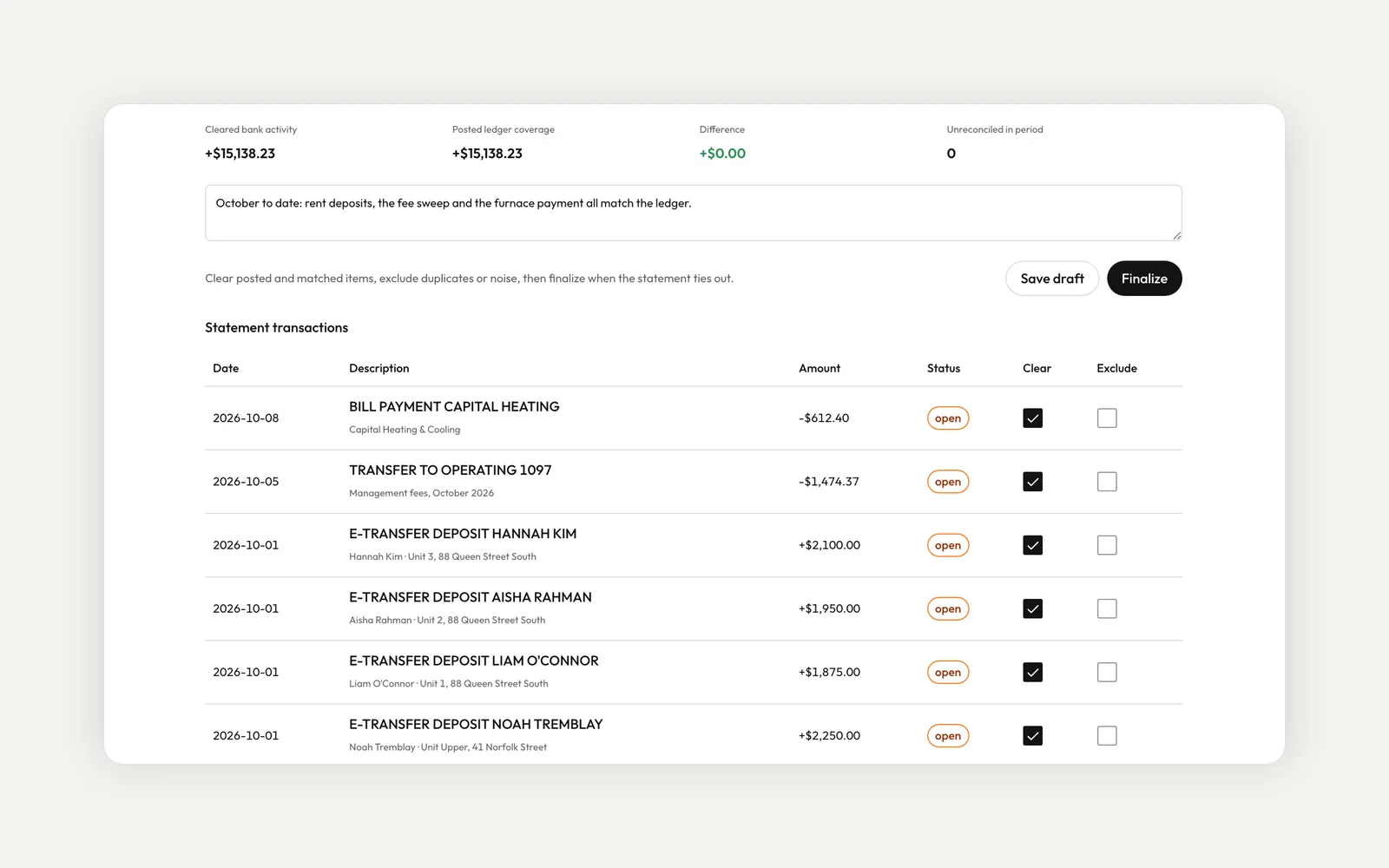
In Accounting, open the More actions menu and choose Reconciliation. Pick a bank account, enter the opening and closing balance from your bank statement, and work through the transactions. Clear the ones that match, exclude duplicates, and add a note. Save a draft as you go, then finalize when the statement ties out. A finalized reconciliation is locked.
When a month is done, you can close the period. That blocks new postings, recoding and voids in that month. You can reopen it later, with a note, if you need to make a correction.
Generate the worksheet and sign it off
On the same page, choose Generate worksheet. The Trust Reconciliation Worksheet shows your trust bank balance, owner liability, deposit liability, total trust liability and the discrepancy, with a badge that says In balance or Out of balance against your threshold. Below that is a line for each owner and property. If it's out of balance, Kera asks you to review the difference before you sign off.
The badge is a starting point, not a sign-off. Before you sign, check the trust bank balance against your bank statement and the owner lines against your ledger. Then download the worksheet as a PDF on your letterhead and sign it off. Kera records who signed and when, and a signed worksheet can't be signed again. Each worksheet is a snapshot from the moment you generate it, so generate it on the day you want on record.Note 1
Do I have to connect my bank?
No. You can add bank accounts by hand and reconcile them against your statements. The worksheet's trust bank balance comes from the balance Kera has on file for each account, which may be out of date for a connected account and isn't filled in for one you added by hand. Check it against your bank statement before you sign off.
Can I generate a worksheet for a past date?
No. A worksheet is a snapshot from when you generate it. Generate and sign it on the day you want recorded, and keep the PDF.
Does Kera tell me my trust account is in balance?
The worksheet compares the trust bank balance Kera has on file with what your books say you owe, and shows In balance or Out of balance against your threshold. Treat that as a check to review, not a verdict: you confirm the figures and sign it off.
Does this make my trust account compliant?
No software can decide that for you. These tools help you spot and record problems, and whether a trust rule applies to you depends on your registration.
To get started, classify your bank accounts and set your threshold in Settings, under Accounting. Then open Accounting and choose Reconciliation from the More actions menu. On an organization account, finalizing a reconciliation, closing a period and signing off depend on the accounting permissions in your role. Accounting is part of Kera's accounting plan, so if you don't see Accounting in your sidebar, contact us. For the bigger picture, read our guide to three-way trust reconciliation.
- Kera's trust accounting tools help you follow the trust rules that apply to you, such as TRESA 2002 and O. Reg. 567/05 in Ontario. They support, but don't replace, your brokerage's obligations under TRESA or your province's rules. Whether a rule applies to you depends on your registration. This is not legal advice. ↩
Run your whole business on Kera
Flat pricing, no per-door fees. Built for property managers.